
Falls are one of the biggest threats to people as they get older or deal with mobility challenges. Having spent years as an EMT First Responder, I’ve seen just how serious a single fall can be. The good news is, smart home technology has come a long way, making it way easier to lower fall risk and support safer living at home.
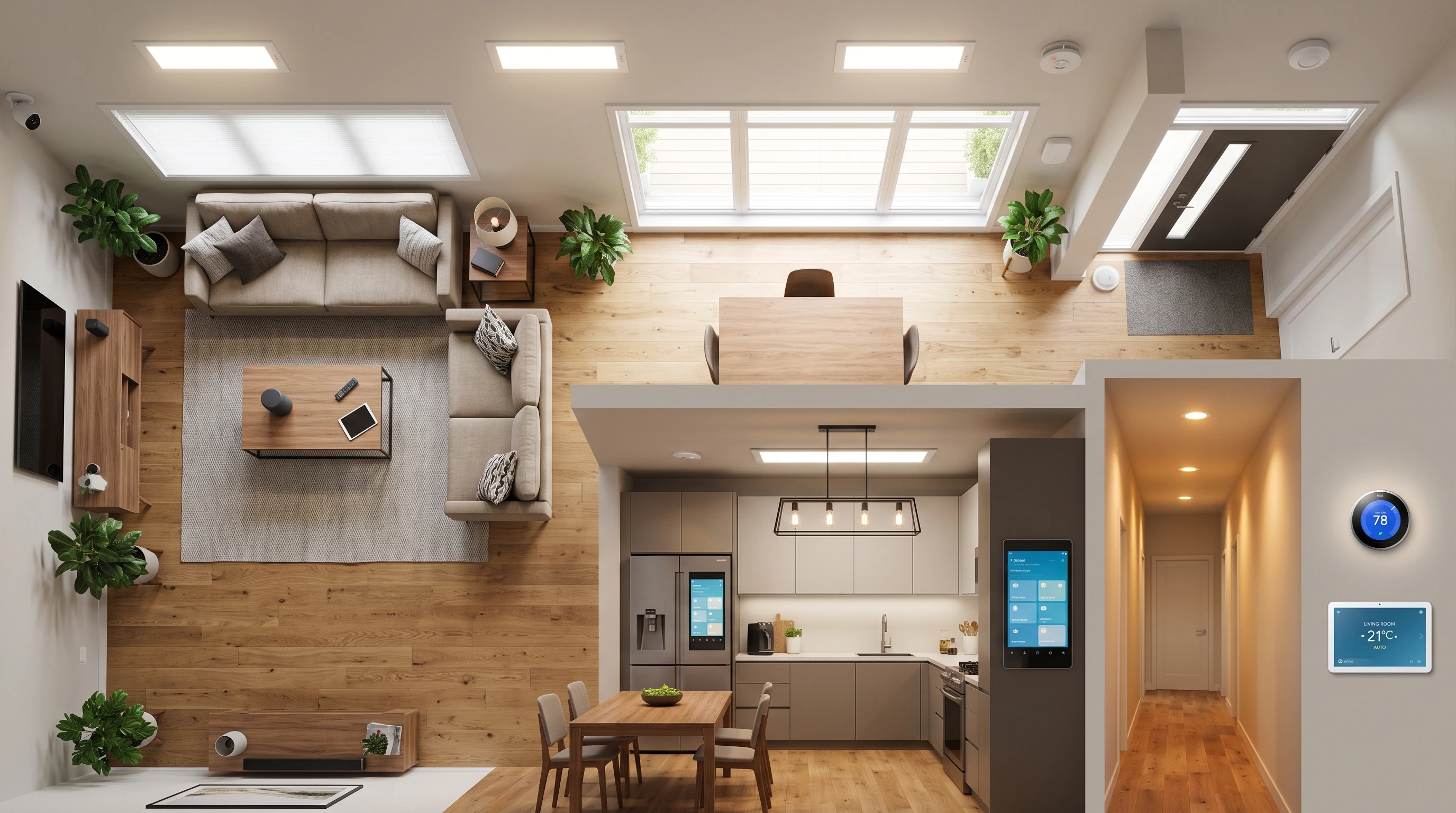
How Smart Home Tech Helps Prevent Falls
Tech for the home isn’t just about fancy gadgets. Products like motion sensors, voice assistants, and automated lighting genuinely make a home safer. When I worked in retirement communities, I got to see how a few small upgrades gave residents more independence while keeping them protected from hidden hazards.
Falls can happen for a lot of reasons. Poor lighting, cluttered floors, or even just not having a free hand when trying to turn on a light can all be trouble. Smart home tech takes out a lot of these risk factors by anticipating what people need and fixing issues before they result in an accident.
Affiliate Disclosure: This post contains affiliate links. If you purchase through one of these links, I may earn a commission at no additional cost to you. As an Amazon Associate I earn from qualifying purchases.
Main Types of Smart Home Devices for Fall Prevention
Not all devices are created equal, but certain types of smart tech can really lower risks day to day. Here’s what I recommend checking out if fall safety is your goal:
- Automated Lighting: Motion sensor or voice controlled lights that turn on the moment someone enters a room or hallway.
- Fall Detection Sensors: Wearable or wall mounted devices notice sudden movements or impacts and send out alerts to caregivers or emergency contacts.
- Smart Door Locks and Entry Sensors: No more fumbling for keys. These allow easy entry and exit, and some even notice if a door is left open and send a reminder.
- Voice Assistants: Tools like Amazon Alexa or Google Assistant can call for help, control other devices, or remind someone to take safety steps, all handsfree.
- Smart Plugs and Outlets: Remotely turn off devices or lights. This is particularly helpful when outlets are tough to reach or bending down presents a fall risk.
- Environmental Sensors: Monitor for water leaks, smoke, or changes in temperature that could lead to slippery floors or other hazards.
How Automated Lighting Prevents Accidents
One of the most basic but super effective ways to lower fall risk is to tackle the issue of poor lighting. I can’t count how many fall reports I’ve responded to that were caused simply by someone missing a stair or tripping over something because they couldn’t see it.
Smart lights that turn on with a motion sensor can completely remove the need to search for a switch in the dark or walk through unlit areas. Some options let you control brightness levels, which is handy for people who get easily disoriented with sudden changes in light.
If you or someone you care for often gets up in the middle of the night, look for bulbs with motion detectors that work specifically for bathrooms and hallways. These easy changes make a real difference for peace of mind and everyday safety.
Another benefit comes from smart lighting schedules. You can program lights to come on gradually at dusk and shut off at bedtime, ensuring there’s always enough light when it’s needed most. This takes guesswork and manual switches out of the equation. For households with more than one person, setting up multiple lighting zones helps keep bedrooms dark for restful sleep while safely lighting up hallways and bathrooms.
Voice Assistants Create Safer, More Accessible Spaces
Voice assistants are much more than a high tech novelty. In my experience, they’re easily one of the most useful tools for people at risk of falls. Not everyone is able to walk over and manually turn off a lamp or adjust the thermostat. Saying a simple command does all the work, which means no need for walking, bending, or stretching.
Most smart speakers can also handle emergency calls. If a fall does happen and the person can’t reach a phone, a voice command can instantly connect them with family or emergency services.
For those living alone, voice reminders for taking medications, hydrating, or checking the environment (like “Hey, check if you left anything by the stairs”) are all possible. These little nudges help form safer routines without feeling intrusive. You can even set up custom routines, combining multiple reminders or controls with a single phrase, making daily life both safer and more convenient.
Smart Sensors Catch Problems Before They Cause Falls
Fall detection sensors are pretty handy, especially for higher risk individuals. I’ve seen both wearable and fixed sensors in action, and each has strengths. Wearables like pendants or wristbands notice sudden movements and can text a loved one if they detect a fall. Fixed sensors, often mounted in common areas, notice when someone has been still too long or moved in a way that looks like a fall, and they work without needing to be worn all the time.
Environmental sensors also play an underrated role. Water leaks from a sink or tub often cause slippery floors. Getting alerted right away means you can clean up before anyone slips, and some systems can even shut off water automatically if a leak is detected. Smoke and carbon monoxide sensors that connect to your phone can get your attention before minor hazards become bigger risks for falls and injury. Some advanced home monitoring systems will even let you check in remotely, providing peace of mind for family members who can’t be there in person every day.
Choosing the Right Devices for Your Home
With so many products on the market, it’s easy to feel a bit lost. From what I’ve seen both in the field and in retirement communities, most people benefit from starting simple and building up. For example, set up motion sensor lighting and a smart speaker first. These give an instant boost in safety and can be expanded on over time.
Think about what areas are most used or where issues have come up before. For a lot of older adults, fall risk is higher at night, in bathrooms, on stairs, and at the front door. Placing the right device in these spots can have a bigger impact than just filling the house with gadgets. Also, it’s important to keep things straightforward. If tech is too confusing, folks often stop using it altogether. Before making a purchase, check compatibility so that devices work together rather than requiring multiple separate apps.
Common Roadblocks and How to Tackle Them
Even great tech won’t work if it’s set up poorly or isn’t used correctly. Here are some frequent hurdles I’ve run into and how I help families address them:
- WiFi Connectivity: Smart devices rely on a good internet connection. If you’ve got dead zones or spotty coverage, consider a WiFi extender.
- Privacy Concerns: A lot of people are (rightfully) concerned about smart home devices watching or listening all the time. Many modern devices have privacy modes or let you review exactly what’s recorded and sent.
- Device Overload: Too many devices can become overwhelming, especially if each one uses its own app. Look for systems that work together through a single app or dashboard.
- Power Outages: If the power goes out, so do most WiFi reliant devices. Some fall detection systems include battery backups, something I’d always suggest paying extra for just in case.
It’s important to set aside time to learn how new devices work and to go through a “dry run” to make sure all the safety alerts work as expected. Practice scenarios can smooth the way for real emergencies. Many manufacturers offer online tutorials or customer service chat to assist if setup gets tricky.
Tips for Getting the Most Out of Smart Home Tech
- Do a Home Safety Walkthrough: Start with a walkthrough to track down common tripping hazards, dark zones, or complicated entryways. That’s how I always kicked things off in my professional safety checks, and it works great for spotting where tech could help.
- Keep It Simple: Choose devices with easy controls and clear instructions. A little label or sticky note by a new gadget can make a big difference in helping everyone remember what it does.
- Ask for Help: Many communities and tech retailers will help set up devices. Don’t be shy about asking a family member or trusted friend to lend a hand if wiring or WiFi setup is new to you.
- Stay Up to Date: Tech companies often roll out new features through software updates. Make it a habit to check for and install updates regularly for both safety and performance improvements.
- Personalize for Individual Needs: Think about individual physical abilities and daily routines to fine tune each device’s settings. Adjusting sensitivities or customizing reminders can go a long way toward making the system work in real life, not just in theory.
Real World Impact and Stories
During my time as a first responder and running safety programs in retirement communities, I’ve seen just how much smart tech can change lives. I once worked with a resident who fell trying to turn on a hallway light. The simple fix was motion triggered lighting. After that, no more late night falls, and they felt so much more confident moving around at night. Small changes like this add up and turn an average home into a much safer and more comfortable place to live.
Another story that stands out is a couple that used smart door locks and voice assistants so that the husband, who had dementia, could safely enter and exit their home without worrying about lost keys or forgetting to lock up at night. Their family said it made a world of difference not only for safety but for supporting independence. These first hand accounts show the value of thinking ahead and investing in tech that steps up everyday life in simple, meaningful ways.
Frequently Asked Questions
How expensive is it to add smart tech for fall prevention at home?
Prices range depending on what you add, but basics like motion sensor lights or an entry level smart speaker start under $50 each. You don’t have to automate everything at once. Start with the highest risk areas and go from there.
Does smart home tech work if someone has memory issues or dementia?
Many devices are designed to be handsoff and work automatically, so they’re a good fit even when memory is a challenge. Voice assistants are also really helpful with reminders and simple commands.
Is there a monthly fee for fall detection sensors?
It depends on the brand. Some wearables include a free alert system, while others charge a monthly fee for 24/7 monitoring or emergency dispatch.
Why Smart Home Tech Is Worth Considering for Fall Prevention
Smart home devices are reshaping the way we think about safety and independence. For many people, especially seniors or those dealing with mobility or memory challenges, this tech is a gamechanger for healthy, confident living. The solutions don’t have to be complicated. A couple of well placed lights or sensors often go a long way. Based on what I’ve seen both personally and professionally, these tools create safer homes and give everyone that little bit of extra peace of mind.
As a work‑from‑home mom, I often feel pulled in two directions: keeping up with my toddler while also caring for my elderly mom who lives with us. It can be overwhelming trying to stay present for both, and I’ve been thinking that smart home technology might be a practical way to ease some of that stress.
I especially like the idea of motion‑sensor lighting and voice assistants, since those could help my mom move around more safely without me needing to hover constantly. It would give her more independence while giving me peace of mind.
From your experience, which smart home device do you think makes the biggest difference right away for families juggling caregiving and young kids at the same time?
Thank you for sharing this Leica. Caring for an elderly parent while raising a young child and working from home is certainly a lot to juggle. But it is also a special time to embrace. Safety is definately a concern. You need be able to provide for your family. Preventable injuries can affect that.
If I had to choose one smart-home upgrade that can make an immediate difference, I would probably start with motion-sensor lighting, especially in hallways, bathrooms, bedrooms, and along the path your mom uses at night.
One of the biggest advantages is that there’s really nothing for her to learn or remember. The lights simply come on when she needs them. Good lighting can help her see obstacles, changes in flooring, furniture, and other potential trip hazards while allowing her to move around the house more independently.
A voice assistant would probably be my second choice. Being able to turn lights on, set reminders, make certain calls, or ask for information without having to walk across the room can be very helpful.
I’m a big believer that technology should support independence rather than make someone feel like they’re constantly being monitored. Starting with a few simple devices that solve specific problems is usually better than trying to make the entire house “smart” all at once.
Thanks for the great question. I think this is something a lot of families caring for both children and aging parents can relate to!